Systems Department
Computer and Teleinformation Networks
ul. Świerkowa 20 B
15-328 Białystok
mail: dit@uwb.edu.pl
tel. 857457095
tel. 857457777
CONFIGURATION
Student connection parameters
| Parameter | Value |
|---|---|
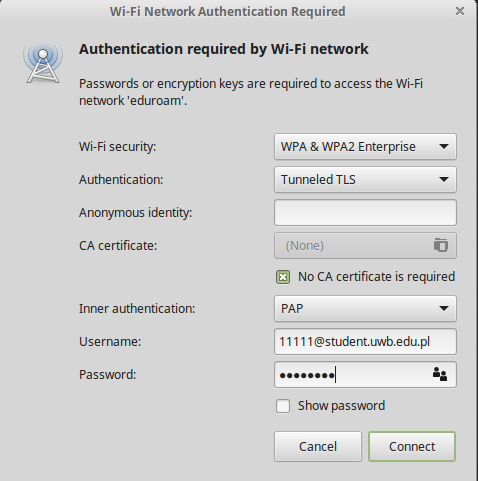
| SSID | eduroam |
| Security | WPA2/WPA3 Enterprise |
| EAP method | TTLS |
| Phase 2 / inner authentication | PAP |
| Username / identity | student_number@student.uwb.edu.pl |
| Password | current student password |
| CA certificate | do not select manually / not required |
| Domain / authentication server | radius.uwb.edu.pl |
| User certificate | none |
| Server certificate validation | DISABLED |
Student username — important
Use your student number followed by
@student.uwb.edu.pl.
The part before @ must be your student number.
✓ Correct username
12345@student.uwb.edu.pl
✗ Incorrect usernames
12345
jkowalski@student.uwb.edu.pl
j.kowalski@uwb.edu.pl
Do not use initials, an e-mail alias,
your name, or the student number without
@student.uwb.edu.pl.
Server certificate validation: DISABLED.
For the current student configuration, do not manually enable
certificate or server-name validation.
Use the settings shown in this guide and the current UwB profile.
If eduroam was configured previously
Remove the saved eduroam connection profile from your network manager and create the connection again using the current settings.
Configuration of the eduroam students network - Linux
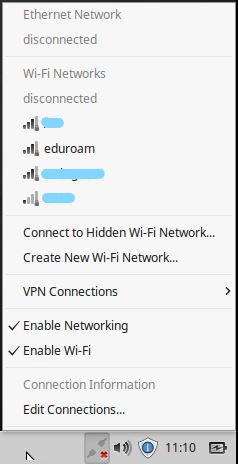
Enter networks and select eduroam. Configure pop-up window as below (picture 2). Identity: student_number@student.uwb.edu.pl. Password: your current student password.
1.
2.